
If you're heading to Disneyland Paris and you're on the fence about the PhotoPass, this one's for you. It's one of the few Disney add-ons we genuinely think pays for itself — if you know how it works and what you're getting.
Below we walk through everything you need to know: what the PhotoPass actually is, how it works on rides and with characters, the different types you can buy, and whether it's worth the money. There's a full video guide at the end too, if you'd rather watch than read.
So, what actually is the PhotoPass?
The PhotoPass is essentially a small plastic card you use throughout your stay at Disneyland Paris to collect every photo taken of you in the parks.
There are three main types of photo you'll end up collecting: **Ride photos.** These are the on-ride shots taken automatically as you whizz past the camera. When you come off the ride, head to the photo point, find your photo number on the screen, and a cast member will adjust it to fit the frame and scan your PhotoPass to add it to your collection. Some attractions you can see a preview of these when you leave the ride others the photo may appear suddenly. One thing to bear in mind that on ride photos if anyone else who is in the same ride vehicle as you is doing anything inappropriate. The the ride photo will not be added to the pass.
 **Character photos.** When you meet a character, there's often a PhotoPass photographer working alongside them. They'll take a series of shots during your interaction — hugs, poses, the whole thing. This is especially useful if you're travelling as a couple or family, because you actually get to be *in* the photos together instead of one of you holding the camera.
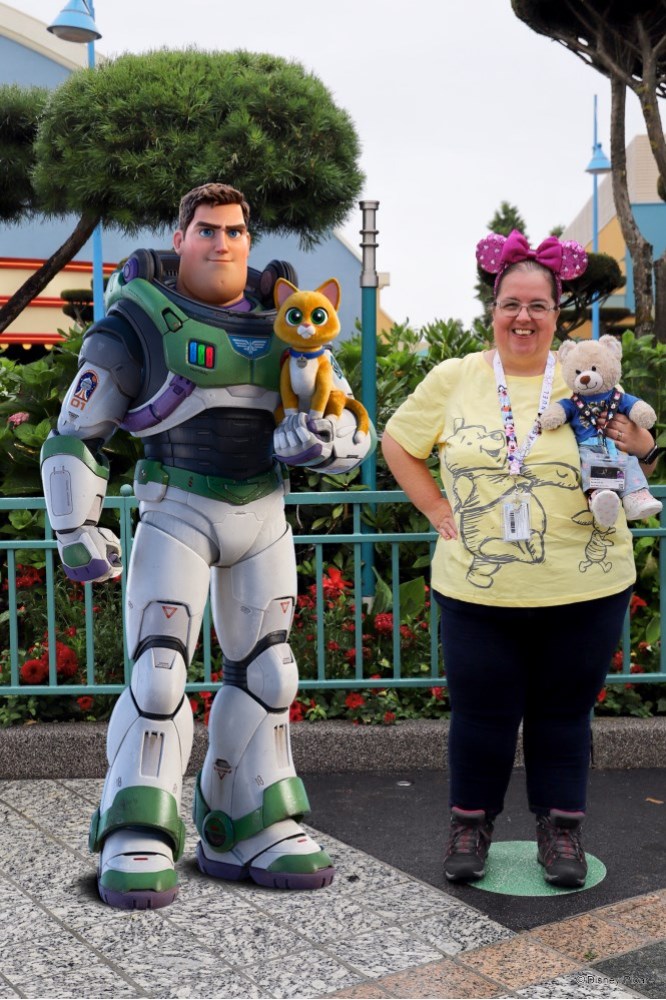 **Magic Shots.** These are our favourites. You'll spot a photographer at a stand with a sign showing the effect — they'll have you stand on a coloured dot, strike a pose, and later when your photos appear online, a Disney character or magical effect has been added into the shot.
How to view and download your photos
To see your photos, you'll need to head to the PhotoPass website( https://www.disneyphotopass.eu/) and create an account.
You'll be asked for your PhotoPass ID — this is located on the back of the pass where you will find a barcode on the back of the card.
Once it's linked, the system pulls in all your photos.
A few things worth knowing:
- Photos usually take around **30 to 40 minutes** to appear after being taken.
- Once they're on the site, they stay there for **up to a year**, so there's no rush to download everything before you fly home.
- You can download your favourites at your own pace and keep them forever.
The three types of PhotoPass
**1. The temporary cardboard pass.** If a photographer takes a photo of you (a Magic Shot or character shot) and you don't already have a pass, they'll hand you a free temporary cardboard one. It's only valid for a day — at the end of that day, you'll need to view those photos at one of the photo locations in the park and decide whether to buy them individually or upgrade to a full PhotoPass.
**2. The short-term PhotoPass.** Bought in the shops, this lasts for **10 days from activation**. Your photos remain downloadable for up to a year.
**3. The annual PhotoPass.** Valid for a year from activation. Pricing varies, but if you hold the top-tier **Gold Annual Pass**, the PhotoPass is included for free as part of the package.
Is the Photopass worth the money?
Honestly — it depends on how much you're going to use it. Some people love it, some people don't bother.
For us, the maths usually works out. On an average trip we'll come home with **50 to 60 photos**, and on our last trip we ended up with **over 100**. When you think about how much a single ride photo costs to buy on its own, the PhotoPass pays for itself pretty quickly — and you end up with a proper collection of memories rather than a handful of one-offs.
The real value, though, isn't the price per photo. It's that you actually get to *be* in the photos, properly, without anyone fumbling with a phone. Years later, those are the ones you'll be glad you have.
**Do I need to buy a PhotoPass before I go?**
No. You can pick one up in the parks, or start with a free temporary cardboard pass from any photographer and upgrade later if you decide you want to keep the photos.
**How long do I have to download my photos?**
Up to a year from when they were taken — plenty of time to sort through them after you get home.
**Does the annual PhotoPass cover the whole year?**
Yes — a year from the activation date. Worth it if you're doing multiple trips, or if you already have the Gold Annual Pass (in which case it's included).Full video can which explains all the above can also be found here https://youtu.be/KMhz1bIM9G4
---
*Note all the information above is correct at time if writing. *


